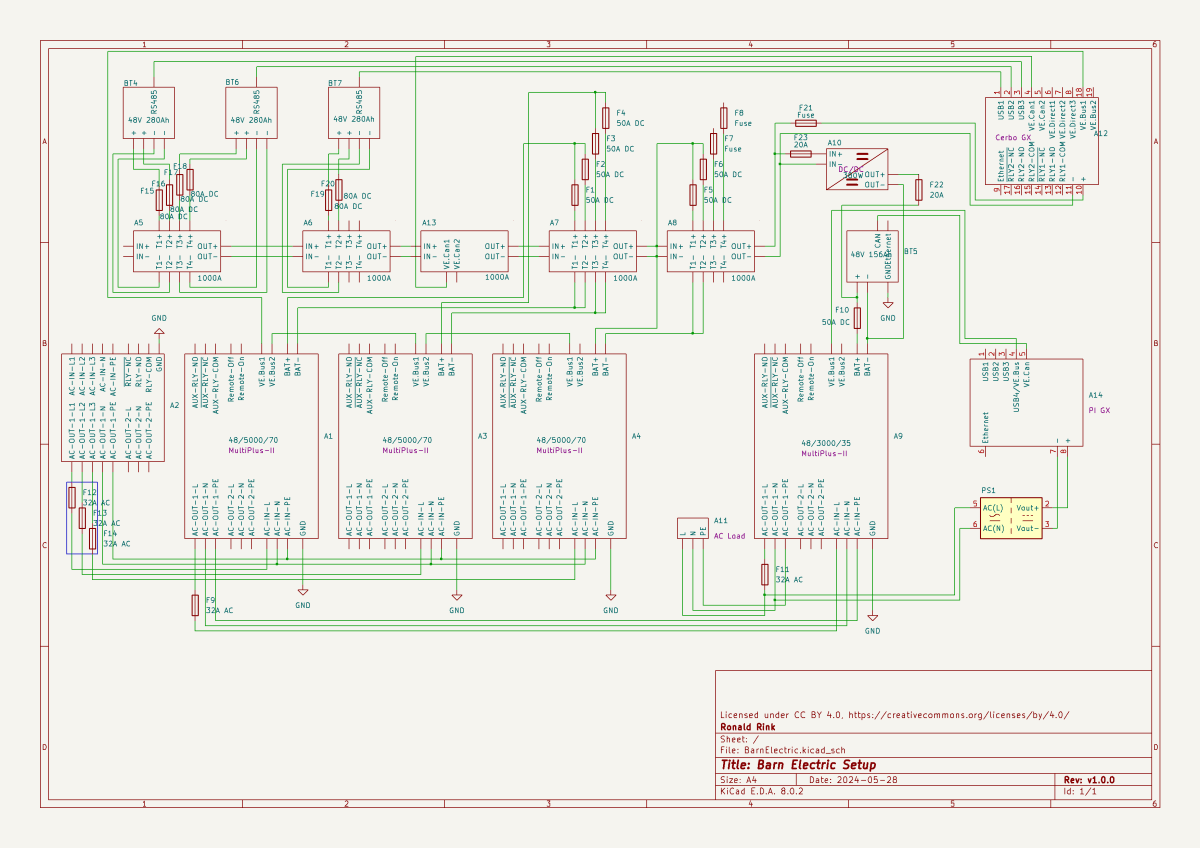
I recently wrote about our upcoming solar PV adventure. But before updating our system, I thought it was time to document and explain our current setup (with the help of KiCad).
This system is the main electricity for our barn and currently consists of three batteries with an energy (often referred to as “capacity”) of 3* 14.33kWh = 43kWh (battery bank A, A1:A2 on the plan). These batteries are charged by a JCB G20QS (B1) via three MultiPlus-II 48/5000/70 inverters/chargers (B1:C2) which are by default in “Charge Only” mode. The MultiPlus-II are configured in a 3-phase configuration but only turned on when 3-phase is actually needed.
The main power is delivered by a MultiPlus-II 48/3000/35 (B4:C5) that is connected to a separate battery bank (battery bank B, BYD LVS Premium Battery-Box with an energy of 8kWh). This latter MultiPlus-II is connected to L1 of the 3-phase MultiPlus-II. So, whenever the main batteries get charged the cascaded inverter will also be charged. In addition, we can then use PowerAssist to up to supply 8'000VA (= 5'000VA + 3'000VA) when running on batteries and up to 14'500VA (= 6'500VA + 5'000VA + 3000VA) on a single phase.
Though the generator can supply up 14'400W the chargers of the Multiplus-II can only charge with a power of up to 3* 48V* 70A = 10'080W. This is actually an advantage as the optimal efficiency factor of the generator is roughly at 12'000W. So with 210A we are pretty close. If we ever added more chargers to the system we could even slightly increase the charge current to 250A.
System A with the 3-phase inverter configuration is connected to a Lynx bus bar (A1:B4) that also includes a Lynx shunt (B3) used for measuring over all batteries. In addition, there is an islolated Orion-Tr DC-DC charger (A5) that constantly feeds system B.
System A and B are connected to their separate GX:
system A Cerbo GX, A5:A6 MultiPlus-II via VE.Bus, Lynx Shunt via VE.Can, JK-BMS via RS485/USB
system B Raspberry Pi4running VenusOS, B5:B6 MultiPlus-II via VE.Bus, BYD BMS via VE.Can (on a Pi GPIO Hat)
And this is it for the electricity installation in our barn.
Note: This cascaded setup is officially not supported by Victron, but it has been working for us without problems for months now. This might be different in your case.
This is sort of a never ending story for me – just as the installation of our workshop container on the truck bed by our trusty mechanic which has been “in the making” since October 2022.
It is clear that we want and need electricity in the container. Just how and how much is not clear yet. In the following, I will consider our rquirements and different apsects and constraints of the electrical installation to hopefully come to a conclusion. This is a rather dry article with a lot of numbers – so beware …
Here is what we know (or at least think we know):
The truck has a 24V system
Charging any “leisure” batteries via the truck engine on a regular basis does not seem to be a good idea, as the fuel consumption is already 33l/100km without the container (that makes an astonishing 8.56mpg in the UK)
It is a EURO0diesel so we will not be able to get into all the cities (regardless of its problematic weight, length, height and width anyway).
Solar panels are still no real option (most of the time too way up in the North)
Charging from an EVSE might not always be possible as most of these EVSEs are for cars and do not have space for trucks
We want to be able to cook and wash in the vehicle
We will have a 2kWdiesel heater
We will have a 900W single phase petrol generator
We will be using Eve LF280K cells
The inverter must at least provide 2'250VA or 1'800W (concurrently, but not neccessarily on a single phase)
(optional) We would like to have 3-phase power in the container (as the cabling is already in place) – but also we know we would only use it very seldomly (such as for welding, then we need at least 11A per phase)
We would like to be able to charge 60% of the batteries (from 20% to 80%) within 3h
Refrigerator (able to run on 12V DC/24V DC or 230V AC)
Microwave (1'000W)
Water heater (immersion heater with 1'000W or 2'000W and/or kettle with 2'000W)
Table grill (1'250W)
Steam cooker (450W/900W)
Bread baking machine (600W)
Coffee machine (1'150W)
Washing machine (750W)
Water pressuriation system (850W)
Computers peripherals (USB-C charging with 36W via AC or DC, or 60W AC)
Lights (12V or 24V DC)
Water pump (12V or 24V DC)
Fan (12V or 24V DC)
Diesel heater (12V DC)
Starlink (60W AC, possibly 48V DC)
Infrared heating panel (150W AC)
Battery charger (12V/24V DC or 230V AC, depending on model)
Other USB powered and/or chargeable devices (via 12V/24V DC or separate 230V AC charger)
built-in 6t winch (powered by engine)
(optional) electric shower (8'000W)
Sizing the electrical installation comes with a number of additional constraints:
The crane in the workshop garage can lift up to 500kg this mean, all batteries, inverters, washine machine and water tanks must be less that weight
No single battery can charge or discharge with more than 140A
We can only charge from EVSEs with a Type 2 connector
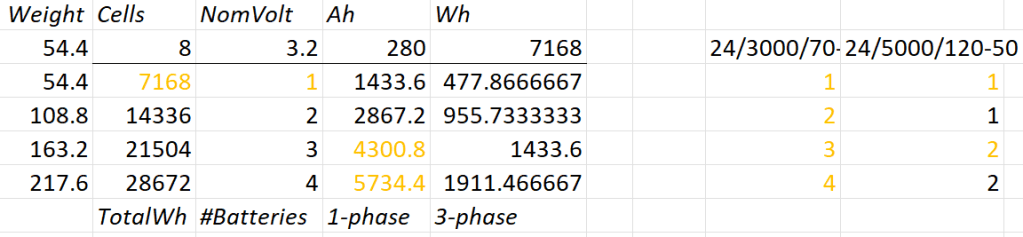
A 12V system is very quickly out of the picture (and the largest and only MultiPlus-II with 12V is a 3’000VA system). Besides, the truck has 24V system anyway. So it is either 24V or 48V. Here is an overview of all current 24V and 48V MultiPlus-II models and their charge and discharge values:
MultiPlus-II 24V and 48V
Let’s first evaluate a 24V system:
Combination of 24V batteries and invertes
1* 8s battery
Capacity is likely to be too small
Single battery is not redundant
1*3’000VA can draw too much discharge current
1* 5’000VA can draw too much discharge current
2* 8s battery
2* 3’000VA can draw too much discharge current
1* 5’000VA possible
3* 8s battery
1-phase charge requirement can only be met with EVSE 7kW 32A Type 2
3* 3’000VA can draw too much discharge current
2* 5’000VA can draw too much discharge current
4* 8s battery
1-phase charge requirement can only be met with EVSE 7kW 32A Type 2
4* 3’000VA can draw too much discharge current
So, in a 24V 1-phase system only the 5'000VA inverter would be possible with either 2 (14’336Wh) or 4 (28’673Wh) batteries.
For a 3-phase setup to support our Kemppi Kempact 253A we would need at least 4 batteries and 3* 5'000VA inverters.
And now let’s have a look at a 48V system where we have a couple of more inverter options:
Combination of 48V batteries and inverters
1* 16s battery
Single battery is not redundant
2* 3’000VA inverters needed
1* 5’000VA inverter possible
1* 8’000VA can draw too much discharge current
1* 10’000VA can draw too much discharge current
1* 15’000VA can draw too much discharge current
2* 16s battery
1-phase charge requirement can only be met with EVSE 7kW 32A Type 2
3’000VA not as 3-phase setup feasible (otherwise 6 devices necessary)
8’000VA only as 3-phase setup, but then too heavy
1* 10’000VA possible
1* 15’000VA can draw too much discharge current
3* 16s battery
1-phase charge requirement cannot be met
charge requirement can only be met with 3-phase EVSE (16A or 32A) Type 2 (11kW+)
3’000VA possible, but too heavy with combined battery weight
5’000VA possible
8’000VA only as 3-phase setup, but then too heavy
10’000VA only as 3-phase setup, but then too heavy
15’000VA possible
4* 16s battery
batteries too heavy
1-phase charge requirement cannot be met
charge requirement can only be met with 3-phase EVSE (16A or 32A) Type 2 (11kW+)
3’000VA too heavy with combined battery weight
5’000VA too heavy with combined battery weight
8’000VA only as 3-phase setup, but then too heavy
10’000VA only as 3-phase setup, but then too heavy
15’000VA only as 3-phase setup, but then too heavy
So, this leaves us with really 3+2 choices:
2* 8s (14’336Wh) batteries in a 1-phase system with a single 5’000VA inverter
Battery and inverters would weigh roughly 140kg
2* 8s (14’336Wh) batteries in a 3-phase system with three 5’000VA inverters
Battery and inverters would weigh roughly 250kg
Not possible for 3-phase welding
4* 8s (28’672Wh) batteries in a 3-phase system with three 5’000VA inverters
Battery and inverters would weigh roughly 310kg
1* 16s (14’336Wh) battery in a 1-phase system with a single 5’000VA inverter
Battery and inverter would weigh roughly 140kg
2* 16s (28’672Wh) batteries in a 3-phase system with three 5’000VA inverters
Battery and inverters would weigh roughly 310kg
3h on a 1-phase 16A Type 2 would charge about 38% (a 60% charge takes 4.7h)
From there, we can narrow this down even further:
1-phase system: 24V, 2*8s
Price: batteries 2* 1’364GBP = 2’728CHF plus inverter 1* 1’359GBP total = 4'087GBP
Con: 24V MultiPlus-II are considerably more expensive (than 48V)
Con: only have the capacity
Con: cannot run electric shower
3-phase system: 48V, 2* 16s
Price: batteries 4* 1’364GBP = 5’456CHF plus inverter 3* 812GBP = 2’436GBP total = 8'802GBP
Con: charge requirement can only be met with 32A Type2 on 1-phase
Con: additional 48V|24V DC-DC converter required
Con: heavier, 300kg+ Con: higher self-consumption in 3-phase configuration
So – drum roll – my conclusion: for roughly double the money in a 48V we would get double the capacity and triple the charge and output power and pretty much can do everything we want the system to be able to do.
The 3-phase system can be reconfigured to a parallel 1-phase system, so we would even be able to use an electric shower (though very unlikely – we have our mobile shower). We can either charge 1-phase or 3-phase and have a longer window of electric autarky. And for most of the time we would leave the system in a 1-phase single device InverterCharger configuration. And additionally, for charging the other 2 devices would bet set to ChargeOnly (but be configured independently configured from each other).
The exact setup I will have to layout some other time, but right out of my head I would think of the following components:
External power in with CEE 16-5, CEE32-5, CEE32-1, CEE16-1 and Neutrik PowerCON True1 TOP (the more the better) connected to an ATS
AC out from MultiPlus-II connected to ATS
Orion-Tr 24V|48V DC-DC converter charging from alternator (though not the norm)
Orion-Tr 48V|24V DC-DC converter as power supply: to support 24V loads in the container as charger: as an emergency charger for the truck batteries
Lynx Power In, Distributor
Venus OS with Raspberry PI for RS-486 and DVCC
So, in case our Saurer ever gets finished – at least I know how to do the electricity …
The other day, I realised that I never wrote about the case build of our 16s 48V batteries, as I did for the 8s case and the 4s case. So, here it is – and I am actually describing 2 revisions as we made some adjustments.
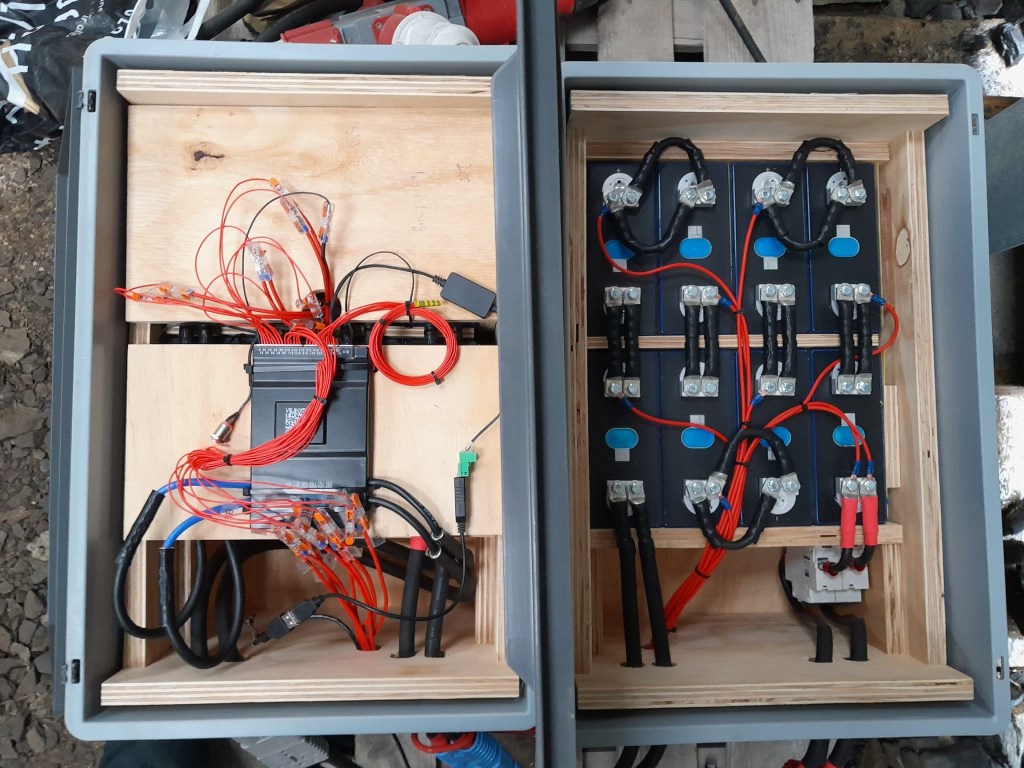
First, the total weight of the cells alone would be roughly 16 * 5.3kg ~ 85kg. This is way beyond what a single person can – or at least should – lift. So, I deciced to split the battery into 2 separate cell blocks of 8 cells each (similar as I did split the 8s battery in the Toyota HiAce). With this approach, I would be able to:
reuse the 8s design (including the RAKO boxes)
be able to move or lift half a battery (which weighs roughly 53kg)
This battery has a nominal capacity of 3.2V * 16 * 280Ah = 14'336Wh and can be charged or discharge with up to 140A ^= 7'168W. We currently have 2 of these batteries running on our 3-phase setup with 3 * Victron MultiPlus-II 48/5000/70-50.
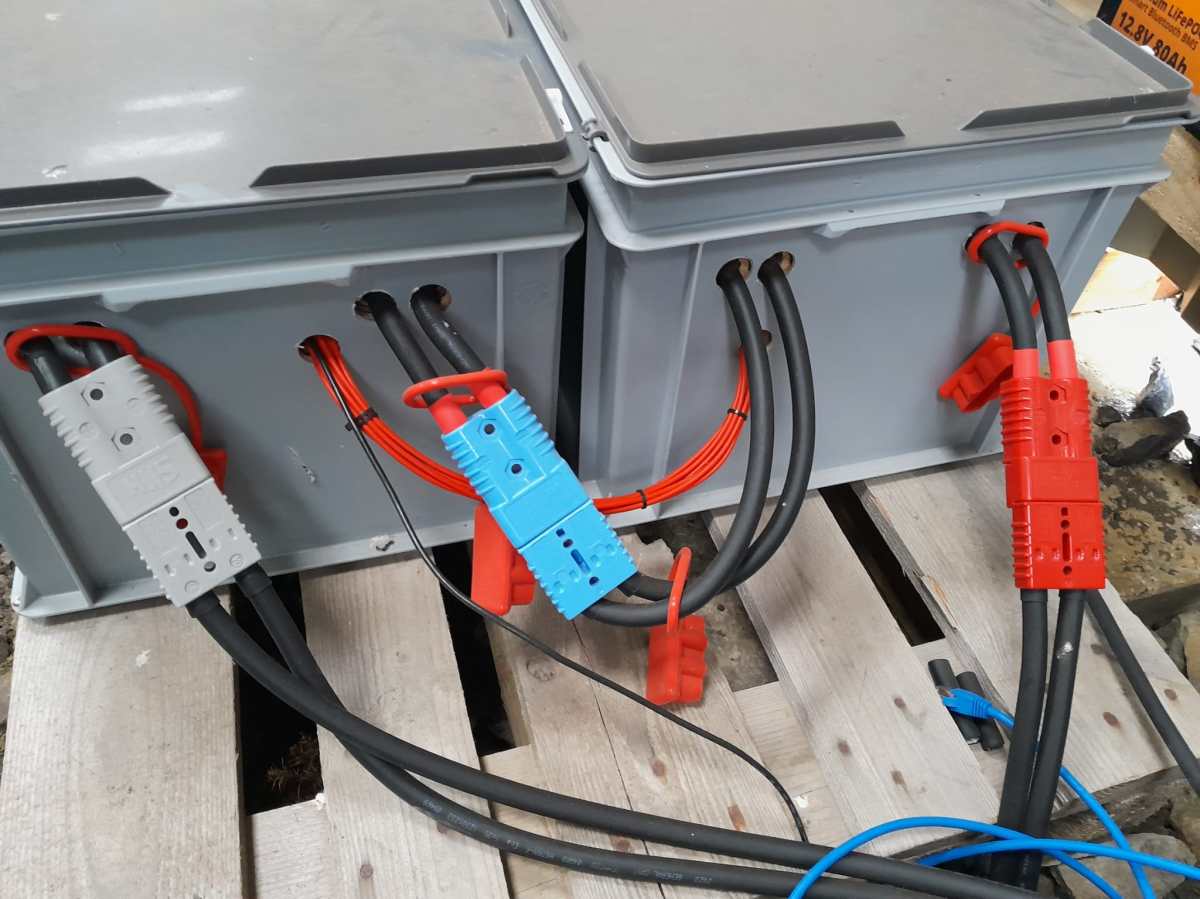
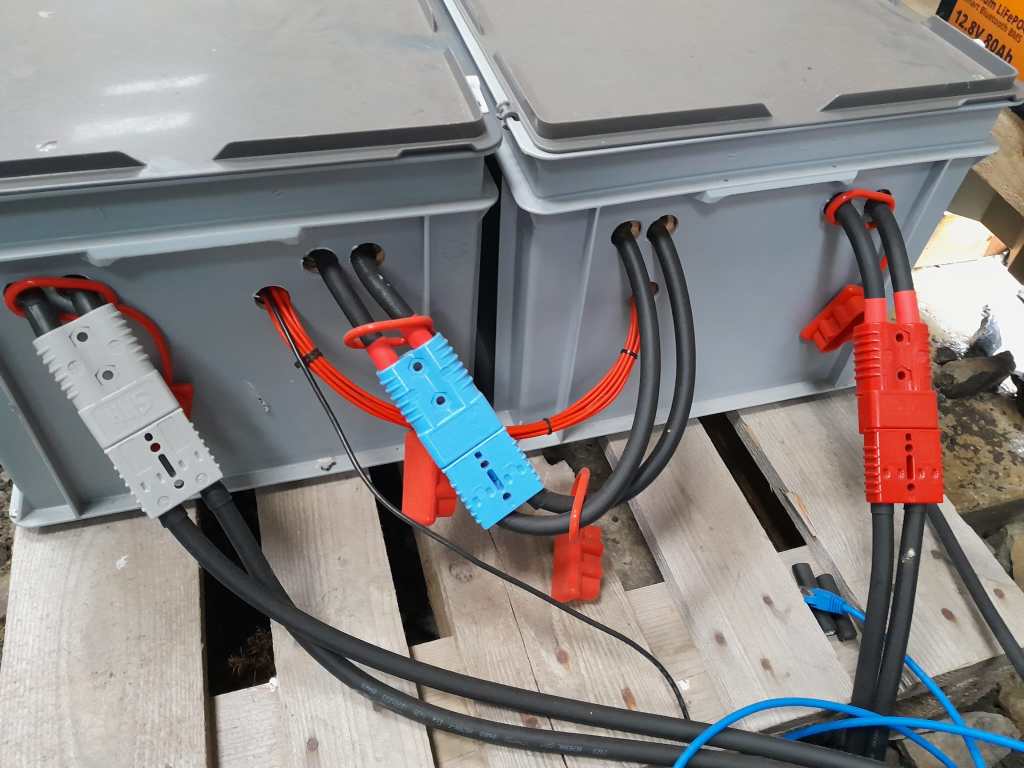
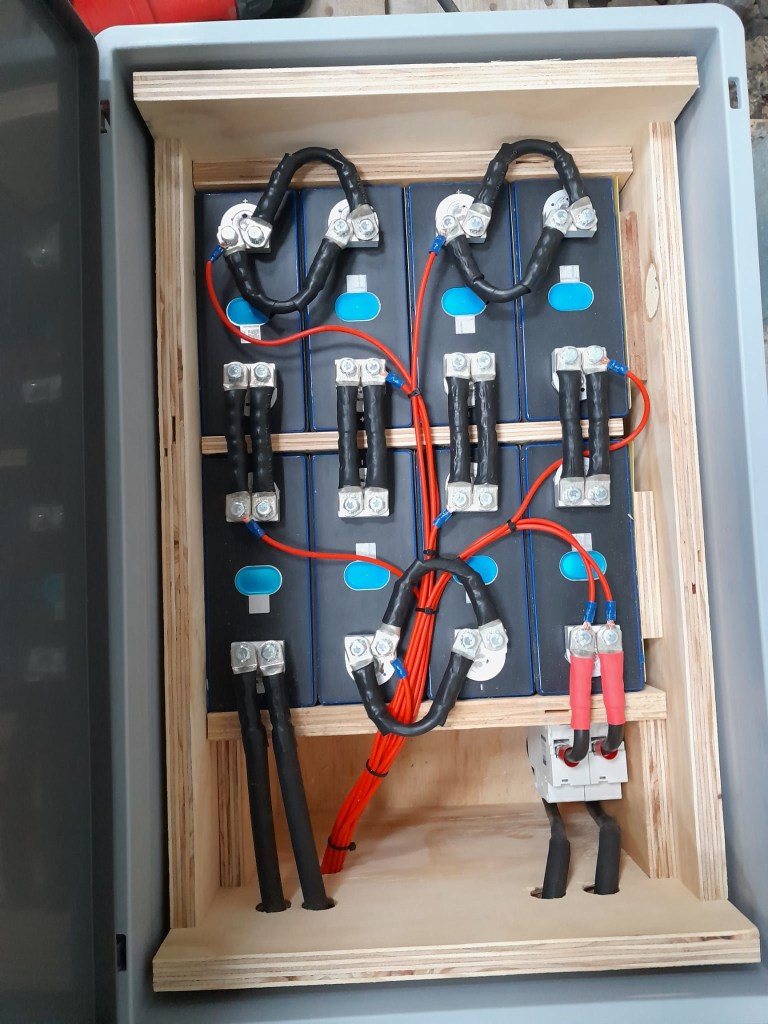
So essentially, I built 2 8s batteries with a connection cable between cells 8 and 9. The main negative and the BMS would be in one box and the main positive with the DC breakers would be in the other box. To avoid confusion, in this setup I went for coloured Anderson SB175 housings, with
Red 2 * 35mm2 H07RN-F cable main positive
Grey 2 * 35mm2 H07RN-F cable main negative
Blue Interconnecting both blocks 2 * 35mm2 H07RN-F cable connecting from cell 9 positive to cell 8 negative
In all cases
16s Battery Connectors
To connect the cells to the BMS balancer cables I extended the balancer cables with 2.5mm2 wire via WAGO 221-2411 inline splicing connectors. I then measured the increased resistance of the additional cable length and adjusted the values in the BMS configuration for cells 1 to 9.
With these inline connectors I am now able to disconnect the blocks from each other so I can move them around independently, if needed.
On the BMS, I connected a USB RS-485 TTL adapater with a USB extension cable which leads to one of the USB ports of the Victron Cerbo GX. With the help of dbus-serialbattery and BatteryAggregator I can control the DVCC settings in Venus OS.
The rest of the build is, as I already mentioned, pretty much like the 8s build.
Revision 1
Here are some images of the completed build of revision 1.
16s Battery top view16s Battery Block 1 main negative with BMS16s Battery Block 2 main positive with DC breaker
Revision 2
These are the changes I am currently making for the next revision:
add additional connectors for the balancer cables to further facilitate the disconnection of both blocks;
use 16mm2 M6 Klauke DIN46235 compression cable lugs for the connection of the main negative (cell 16) to the B- of the BMS (only relevant to the older JK-BMS), to be able to disconnect and potentionally replace the BMS;
use a WAGO 35mm2 DIN rail connector in the main negative block on cell 1/9 for the outgoing cable;
use cable glands on the external connections; (this allows for easy disconnection and re-building the block as an 8s battery);
use ratchet straps for compressing and mounting the cells to enable easier maintainability of the cells;
use Anderson PowerPole PP180 connectors instead of SB175, so I can use mounting plates for the PP180 and do not have dangling cables on the outside of the case (these connectors are expensive and increase the price of the overall build by roughly 60GBP).
In our trailers and vehicles I prefer 24V 8s batteries, as the price-weight-power triangle of our Eve 280Ah cells is hard to match. With a gross weight of roughly 55kg we get a nominal “capacity” of 7168Wh. Even at a low cell voltage of 2.7V we can still get more than 2400W (3000VA) out of the battery. Exactly what a Victron MultiPlus-II 24/3000/70-32 (or any 3000VA inverter/charger for that matter) can deliver.
The Honda EU 10i has a sustained output of 900W which equates to roughly 3.9A at 230V. Now, this is not too interesting by itself.
However, the minimum AC current input of the MultiPlus is 3.6A. So, exactly within the range of the Honda EU 10i. A 5000VA inverter for example, would drain the generator with its minimum input of 4.6A+. And with its fuel tank capacity of 2.1l it runs nearly 4h on full load. Which in turn means, I can charge our 24V 8s battery about 50% without refueling.
Note: ideally we would charge it from 25% up to 75% SoC.
So, for me this generator is the ideal backup when I am away without any EV station nearby. With its 13kg and small form factor (and price) there is always a place in my vehicles where I can put it.
And as a side benefit: when I run the generator along with the inverter I can generate up to 3300W (or over 14A). That is: run my oven and boil potatoes at the same time …
And the generator even makes sense when combined with a Victron MultiPlus Compact 24/1600/40-16 (or its 12V counterpart). They are the smallest inverters/chargers in that power range. They strong enough to run a coffee machine or immersion water heater, but are not pwoerful enough to run a full 2000W appliance. However, in combination with the Honda, they just reach 2180W. Of course, charging a 24V 8s battery with a “Compact” device takes much longer, due to its smaller charger.
Top balancing is a topic where a lot of people have written about – and now it is my turn …
It is common understanding to use a regular charger when top balancing, and one the one hand set the Charge Voltage Limit (CVL) to cellCount * 3.65V and use a reasonable current and wait for an extended period of time until all cells have reached their cell voltage maximum. And reasonable means to use a current where the BMS balancer keep up with and distribute the Amps across the cells without going into a Overvoltage (OVP) for a single cell.
So, instead of using a charger with a high supported current of at least 20A we now can use our regular Victron MultiPlus-II inverter/charger – with the help of Venus OS.
The reason why we cannot use a Victron MultiPlus-II out of the box as a charger is the fact, that is does not support fixed Amp configurations (only maximums). And after a while at a specific voltage the MultiPlus-II would enter Absorption phase and thereby reducing the current over time and stopp charging after a while altogether.
So with the help of a custom service (or Python script based on the dummyservice) we can create a battery monitor and set a fixed current.
I am not going into details on how to get a Venus OS device (Victron Cerbo GX or Raspberry Pi) up and running. There is plenty of information on the internet. Or have a look at this article where I briefly describe the setup of a Pi for our BYD battery system.
The *service* itself can be run from a shell: /data/VirtualBatteryMonitor/VirtualBatteryMonitor.py (I copied the script into /data to survive a firmware update).
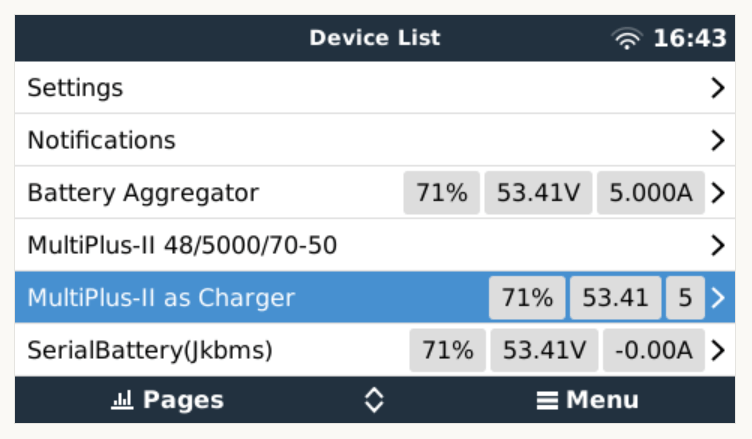
And then the service should appear in the “Device List”:
Our service as a device to support a constant charge current
There are two more configuration entries needed:
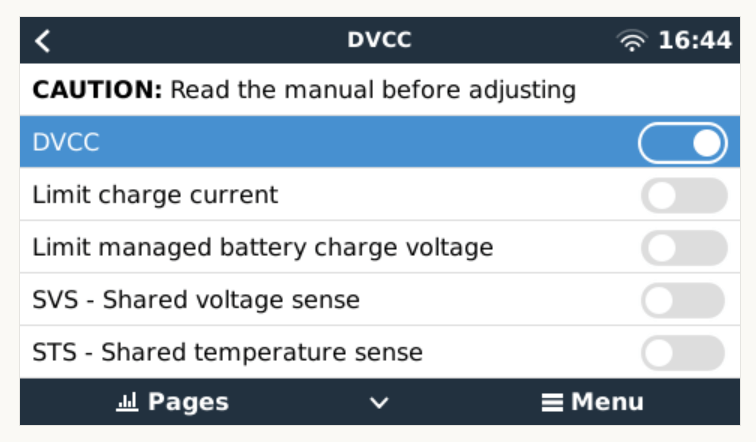
Enable our service as “Battery Monitor” (Settings, System setup, Battery Monitor)
Our service configured as a “Battery Monitor”Enable DVCC
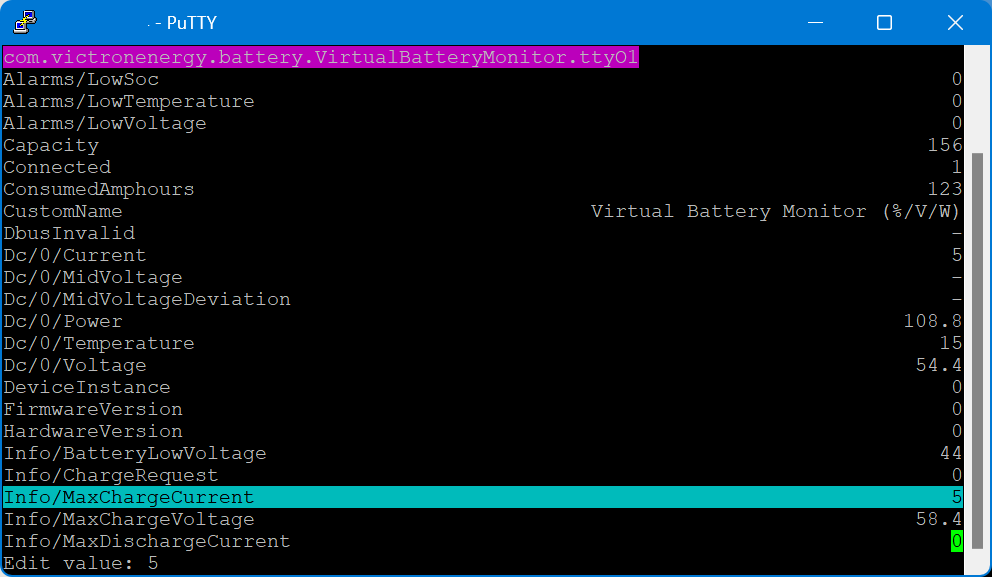
The actual parameters (charge current and maximum voltage) can be configured via dbus-spy from a shell:
Service parameters as shown by dbus-spy
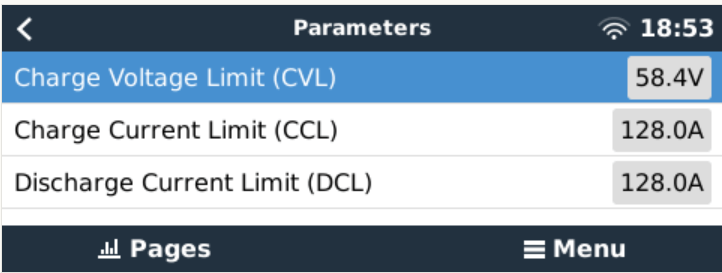
The actually configured values are then shown under “Parameters” of the service (Service, Parameters):
Current configuration set to 5A constant charge current
Note1: There is no need for an actual integration of the BMS with the Venus OS.
Note2: Use at your own risk. Misconfiguring could potentionally harm the BMS, the battery or both.
Note3: Do not leave the script running / the battery charging unattendedly.
#!/usr/bin/env python3

"""
A class to put a simple service on the dbus, according to victron standards, with constantly updating
paths. See example usage below. It is used to generate dummy data for other processes that rely on the
dbus. See files in dbus_vebus_to_pvinverter/test and dbus_vrm/test for other usage examples.

To change a value while testing, without stopping your dummy script and changing its initial value, write
to the dummy data via the dbus. See example.

https://github.com/victronenergy/dbus_vebus_to_pvinverter/tree/master/test
"""
from gi.repository import GLib
import platform
import argparse
import logging
import sys
import os
import dbus
import os

# our own packages
sys.path.insert(1, os.path.join(os.path.dirname(__file__), "../ext/velib_python"))
sys.path.insert(1, "/opt/victronenergy/dbus-systemcalc-py/ext/velib_python")
from vedbus import VeDbusService
from vedbus import VeDbusItemImport

class VirtualBatteryMonitor(object):
    def __init__(
        self,
        servicename,
        deviceinstance,
        paths,
        productname="MultiPlus Charger",
        connection="dbus",
    ):

        try:
            # Connect to the sessionbus. Note that on ccgx we use systembus instead.
            logging.debug("Opening SystemBus ...")
            dbusConn = dbus.SystemBus()
            logging.info("Opening SystemBus SUCCEEDED.")
        except:
            logging.error("Reading system SOC FAILED.")

        logging.debug("Opening dbus '%s' ...", servicename)
        self._dbusservice = VeDbusService(servicename)
        logging.info("Opening dbus '%s' SUCCEEDED.", servicename)
        self._paths = paths

        logging.debug("%s /DeviceInstance = %d" % (servicename, deviceinstance))

        # Create the management objects, as specified in the ccgx dbus-api document
        self._dbusservice.add_path("/Mgmt/ProcessName", __file__)
        self._dbusservice.add_path("/Mgmt/ProcessVersion", "Unkown version, and running on Python " + platform.python_version())
        self._dbusservice.add_path("/Mgmt/Connection", connection)

        # Create the mandatory objects
        self._dbusservice.add_path("/DeviceInstance", deviceinstance)
        self._dbusservice.add_path("/ProductId", 0)
        self._dbusservice.add_path("/ProductName", productname)
        self._dbusservice.add_path("/FirmwareVersion", 0)
        self._dbusservice.add_path("/HardwareVersion", 0)
        self._dbusservice.add_path("/Connected", 1)

        # Create all the objects that we want to export to the dbus
        self._dbusservice.add_path('/Dc/0/Voltage', 3.4 * 16, writeable=True)
        self._dbusservice.add_path('/Dc/0/Current', 5, writeable=True)
        self._dbusservice.add_path('/Dc/0/Power', 3.4 * 16 * 2, writeable=True)
        self._dbusservice.add_path('/Dc/0/Temperature', 15, writeable=True)
        self._dbusservice.add_path('/Dc/0/MidVoltage', None)
        self._dbusservice.add_path('/Dc/0/MidVoltageDeviation', None)
        self._dbusservice.add_path('/ConsumedAmphours', 123, writeable=True)
        self._dbusservice.add_path('/Soc', 75, writeable=True)
        self._dbusservice.add_path('/TimeToGo', None)
        self._dbusservice.add_path('/Info/MaxChargeCurrent', 5, writeable=True)
        self._dbusservice.add_path('/Info/MaxDischargeCurrent', 0, writeable=True)
        self._dbusservice.add_path('/Info/MaxChargeVoltage', 3.65 * 16, writeable=True)

        self._dbusservice.add_path('/Info/BatteryLowVoltage', 2.75 * 16, writeable=True)
        self._dbusservice.add_path('/Info/ChargeRequest', False, writeable=True)
        self._dbusservice.add_path('/Alarms/LowVoltage', 0, writeable=True)
        self._dbusservice.add_path('/Alarms/HighVoltage', 0, writeable=True)
        self._dbusservice.add_path('/Alarms/LowSoc', 0, writeable=True)
        self._dbusservice.add_path('/Alarms/HighCurrent', 0, writeable=True)
        self._dbusservice.add_path('/Alarms/LowCellVoltage', 0, writeable=True)
        self._dbusservice.add_path('/Alarms/LowTemperature', 0, writeable=True)
        self._dbusservice.add_path('/Alarms/HighTemperature', 0, writeable=True)

        self._dbusservice.add_path('/Capacity', 156, writeable=True)
        self._dbusservice.add_path('/CustomName', "Virtual Battery Monitor (%/V/W)", writeable=True)
        self._dbusservice.add_path('/InstalledCapacity', 280, writeable=True)

        self._dbusservice.add_path('/System/MaxCellTemperature', 15, writeable=True)
        self._dbusservice.add_path('/System/MaxCellVoltage', 3.4, writeable=True)
        self._dbusservice.add_path('/System/MaxTemperatureCellId', "C5", writeable=True)
        self._dbusservice.add_path('/System/MaxVoltageCellId', "C2", writeable=True)
        self._dbusservice.add_path('/System/MinCellTemperature', 15, writeable=True)
        self._dbusservice.add_path('/System/MinCellVoltage', 3.4, writeable=True)
        self._dbusservice.add_path('/System/MinTemperatureCellId', "C6", writeable=True)
        self._dbusservice.add_path('/System/MinVoltageCellId', "C3", writeable=True)
        self._dbusservice.add_path('/System/NrOfCellsPerBattery', 16, writeable=True)
        self._dbusservice.add_path('/System/NrOfModulesBlockingCharge', 0, writeable=True)
        self._dbusservice.add_path('/System/NrOfModulesBlockingDischarge', 0, writeable=True)
        self._dbusservice.add_path('/System/NrOfModulesOffline', 0, writeable=True)
        self._dbusservice.add_path('/System/NrOfModulesOnline', 1, writeable=True)
        self._dbusservice.add_path('/System/Temperature1', 15, writeable=True)
        self._dbusservice.add_path('/System/Temperature2', 15, writeable=True)
        self._dbusservice.add_path('/System/Temperature3', 0)
        self._dbusservice.add_path('/System/Temperature4', 0)

# === All code below is to simply run it from the commandline for debugging purposes ===

# It will created a dbus service called com.victronenergy.pvinverter.output.
# To try this on commandline, start this program in one terminal, and try these commands
# from another terminal:
# dbus com.victronenergy.pvinverter.output
# dbus com.victronenergy.pvinverter.output /Ac/Energy/Forward GetValue
# dbus com.victronenergy.pvinverter.output /Ac/Energy/Forward SetValue %20
#
# Above examples use this dbus client: http://code.google.com/p/dbus-tools/wiki/DBusCli
# See their manual to explain the % in %20


def main():
    logging.basicConfig(level=logging.DEBUG)

    from dbus.mainloop.glib import DBusGMainLoop

    # Have a mainloop, so we can send/receive asynchronous calls to and from dbus
    DBusGMainLoop(set_as_default=True)

    pvac_output = VirtualBatteryMonitor(
        servicename="com.victronenergy.battery.VirtualBatteryMonitor.ttyO1",
        deviceinstance=0,
        paths={
            "/Ac/Energy/Forward": {"initial": 0, "update": 1},
            "/Position": {"initial": 0, "update": 0},
            "/Nonupdatingvalue/UseForTestingWritesForExample": {"initial": None},
            "/DbusInvalid": {"initial": None},
        },
    )

    logging.info(
        "Connected to dbus, and switching over to GLib.MainLoop() (= event based)"
    )
    mainloop = GLib.MainLoop()
    mainloop.run()


if __name__ == "__main__":
    main()
For my use case, this really helps as now I have a powerful charging (3 * Victron MultiPlus-II 48/5000/70-32 in parallel) that can charge the battery initally with 140A+ and later with smaller and smaller currents until all cells have reached their maximum voltage.
The other day, I connected my BYD Battery-Box Premium LVS 8.0 to a Victron MultiPlus-II 48/3000/35-32. Here are the steps I took to do it and some errors I ran into.
The Battery-Box needs to communicate via CAN with the inverter. And as Victron inverters do not come with a CAN port by default (unless you go for a MultiPlus-II GX or EasySolar-II GX) we need a GX device. Originally, I wanted to use my Victron Cerbo GX for that, but since we moved into the caravan the device is gone missing. Luckily last year, I supplied myself with a couple of Raspberry Pis (at least model 3and 4 are supported) that could run a Venus OS and act as a GX device. And as I was not the first one doing that, I thought it would be just too easy – well, it was easy after I did everything right.
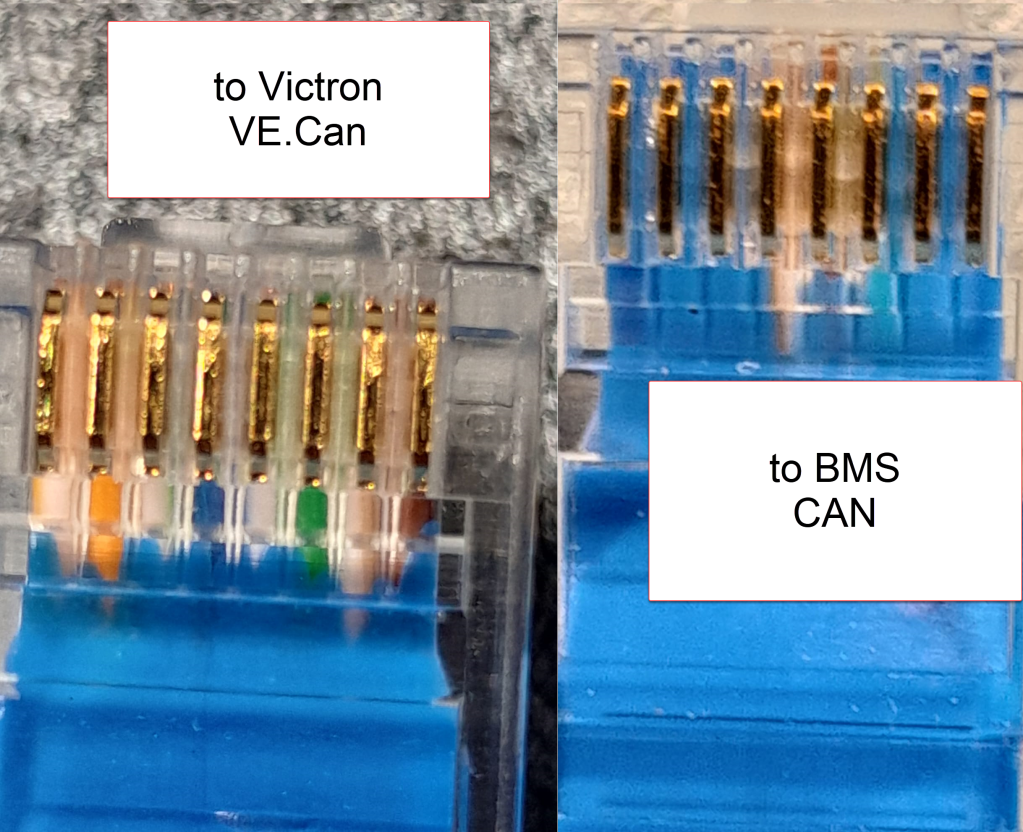
Normally, Victron requests to use a VE.Can to CAN-bus BMS Type A cable to connect to a BYD battery. This is actually an ordinary CAT 5e network cable with RJ45 connectors where only the relevant CAN pins (and GND) are connected.
In order to screw the wires to the CAN hat terminal, I used uninsulated ferrules. Otherwise the Cat 5e wires would have been too soft and light for the terminal.
Installing Venus OS on the Raspberry PI 4
For the Raspberry PI 4, I followed the documentation and installed the standard (and not the large) image. At that time, v2.93 was the newest version (see here for directory of all versions). I uncompressed it and used Win32DiskImager to write the OS to a MicroSD card (all done on a Microsoft Surface Go2 running Windows 11).
Note1: at first, I did the install with a Raspberry Pi 3 Model B V1.2 which also worked fine. However, the CAN device on the Victron UI then did not show any packets but worked without problem.
Note2: The Raspberry Pi 4 is a model B Rev. 1.5 (I mention this, as I saw comments that indicated that there might be a difference between different revision from 1.2 onwards).
Note3: I activated the “Mobile” tile to be able to change the charge current via the overview screen.
The CAN driver then had to be installed separately. As I did not have direct internet access from the Pi, I used the offline install method with a USB memory stick.
As written in the documentation, I copied the compressed installation files as venus-data.tar.gz to the root of the USB drive and restarted the Pi. To verify the automatic installation was successful check if there is a new menu item Package manager at the end of the Settings list. If not visible check if you can find SetupHelper in /data. You can always manually copy it from the SDCard (use mount to see where the card is mounted) and then run setup yourself. I did a reboot after every package.
New menu item in Settings after installation of SetupHelper
Same procedure here. Copying the compressed installation files to the SDCard as /venus-data.tar.gz. Then run the package installation manually if for whatever reason the automatic install does not succeed. See below what the package manager should look like after the installation of both packages.
List of active packages in Package manager
Installing the driver
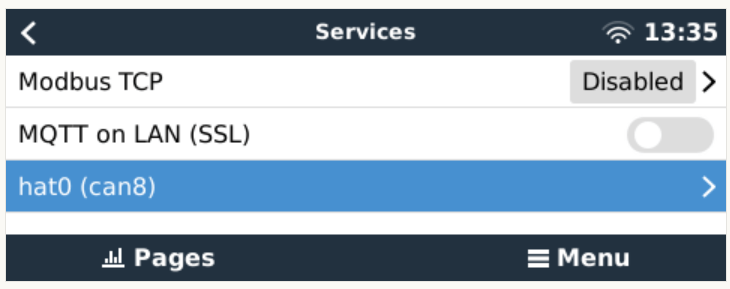
Configuring the driver had to be done from the terminal. There was a minor issue for me which I did not get right the first time. When asked to install an interface via the i option I actually had to type in a hat. I named the device hat0 and after the reboot it showed up as hat0 (can8) can8 spi0.0. In my case it was the “Waveshare 1-channel CANbus Hat 12 MHz crystal” (check the imprint on the silver part on the hat to see the crystal speed).
Configuring CAN bus
There is really not much to configure. The only option under “Services” is to set the communication speed which is 500kB/s for BYD. If the CAN adapter does not show up make sure the correct type has been selected in VeCanSetup. For me it just worked out of the box.
CAN hat showing up in ServicesSetting the CAN speed for BYD Battery-Box BMUConfigured CAN bus
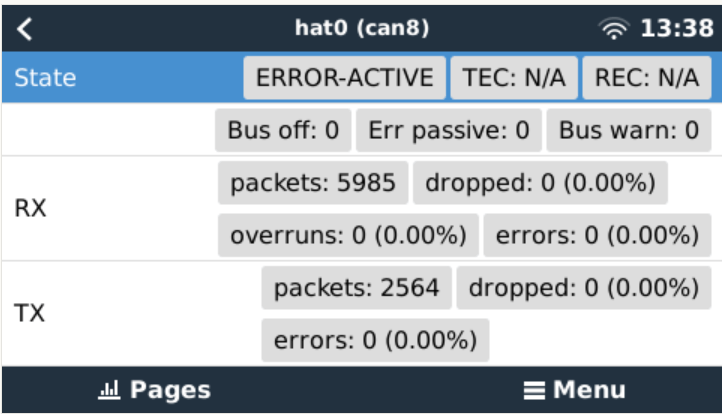
Before the BMS is connected the CAN should show up as ERROR-PASSIVE. As soon as the communcîcation worked it changed to ERROR-ACTIVE.
CAN bus ERROR-ACTIVE with actual traffic
Note: When I tried with the v2.93 on the Raspberry Pi 3 the RX/TX counters were always empty (but nevertheless worked). Via ifconfig the packets were correctly shown. But with the Pi 4 traffic was shown on the UI right from the start.
CAN bus traffic via ifconfig
I did not connect the CAN cable at that point but configured the Battery-Box and the inverter first.
Commissioning the inverter
I used a USB MK3 adapter with an RJ45 Cat 5e cable connected to the VE.Bus of the inverter to configure the MultiPlus.
I used VEConfigure 3 and VictronConnect (to be able to configure via VictronConnect I had to use the zzz password to get out of the read-only mode).
First, I updated the firmware of the MultiPlus via VictronConnect and then continued with VeConfig.
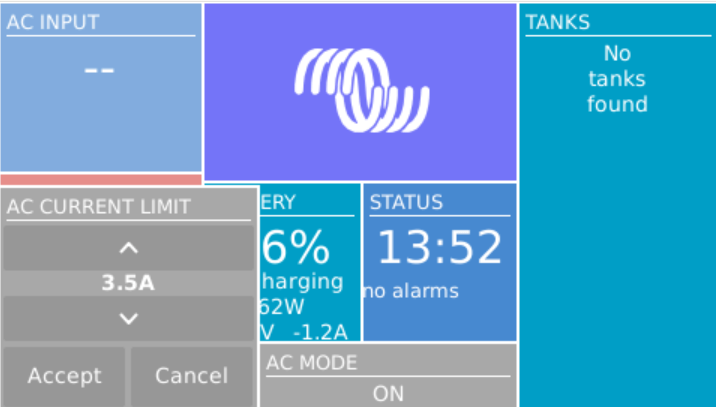
Basically, I set the inverter to off-grid and did not enter a country code. For the battery type I selected “Lithium Iron Phosphate” and accepted the default settings. I set the “AC current limit” to a maximum of 20A (the maximum my generator could handle) and activated the option to have it overruled by “Remote” (which can also be done via the GX Remote Console or VictronConnect).
Setting AC current limit via GX remote console
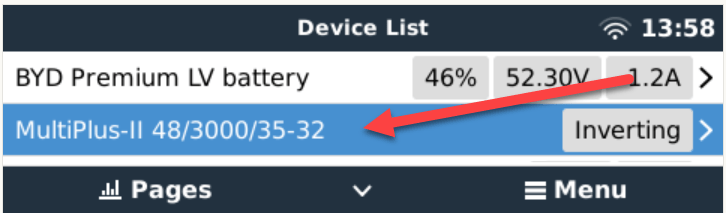
I also activated DVCC to later have the BMS tell the inverter when to charge and how to discharge. This was pretty much it. So I connected the MultiPlus via the VE.Bus and the MK3 cable to the Raspberry where it showed up instantly.
Inverter shows up after connecting VE.Bus to the Raspberry via MK3
Commissioning the Battery-Box
After assembling the battery which conisted of only stacking both battery modules on top of each other followed by the PDU on the very top I connected the BMU via the grey RJ45 to the PDU. After turning on the top most battery the BMU started as well and I was able to connecto to the WiFi of the BMU from the BeConnect app (Android or Windows both worked for me, the latter actually showed more information).
Via the app I pre-downloaded a current firmware and after switching to the BYD access point I applied the firmware (actually two different firmwares). After some waiting the new firmware had been applied and I could configure the basic settings: inverter manufacturer, number of battery modules.
At this stage I connected the 35mm2 cables from the battery to the inverter. I bought the cable preconfigured with the battery. And I used a Littelfuse JLLN-125X (class T) as a fuse between both devices.
Connecting the battery to the Venus OS
And then I connected the BMU to the GX. After some seconds, the inverter clicked and started charging. Essentially, DVCC turns on automatically (even if turned off before) as soon as the CAN communication is established.
In the GX overview the battery appeared and gave some additional information (see next section for details). All parameters between battery and inverter were exchanged automatically.
Things I noted
The battery turns itself off after a while when no communication via CAN is possible. This behaviour is described somewhere in the BYD manuals.
Charging the battery does not work when no CAN connection can be established. The inverter stays in “Absorption” mode with a current of 0A.
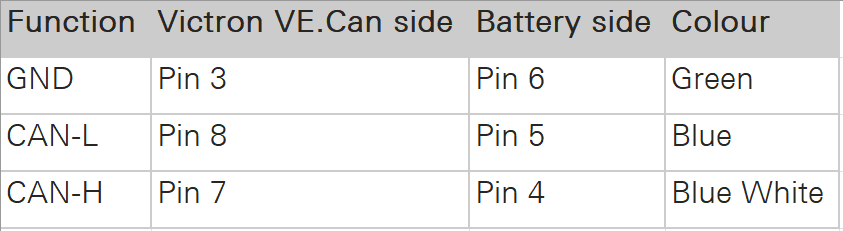
A more detailed description of the pin layout can be found on the BYD manuals. See images below.
The GND pin is not required for communication between the BMU and the VE.Can GX. Only BLUE for CAN-H and BLUE-WHITE for CAN-L are going into the CAN hat.
In addition to the official web site bydbatterybox.com the web site eft-systems.de provides additional information and downloadable documentation.
When charging the Battery-Box for the first time, I eventually reached a 100% SOC. Until that point the charge current stayed nearly constant at around 30A (Bulk). It decreased to around 1.2A and the inverter turned to “Absorption” but never stopped charging. At some point one of the cells reached a voltage of over 3.7V which resulted in a warning on the GX. Nevertheless, charging continued. I manually switched off the charger after the second time I received a warning due to high cell voltage. I would have expected to have the inverter automatically stop charging at a 100% SOC. Maybe the BMS only measures the charge voltage limit (CVL) which is defined as 58.4V and not the individual cells?
The cells in a battery were not really well balanced (delta >= 100mV). I would have expected a better balancing. Actually, I do not know if the BMS has a balancer at all. I could not find anything in the documentation.
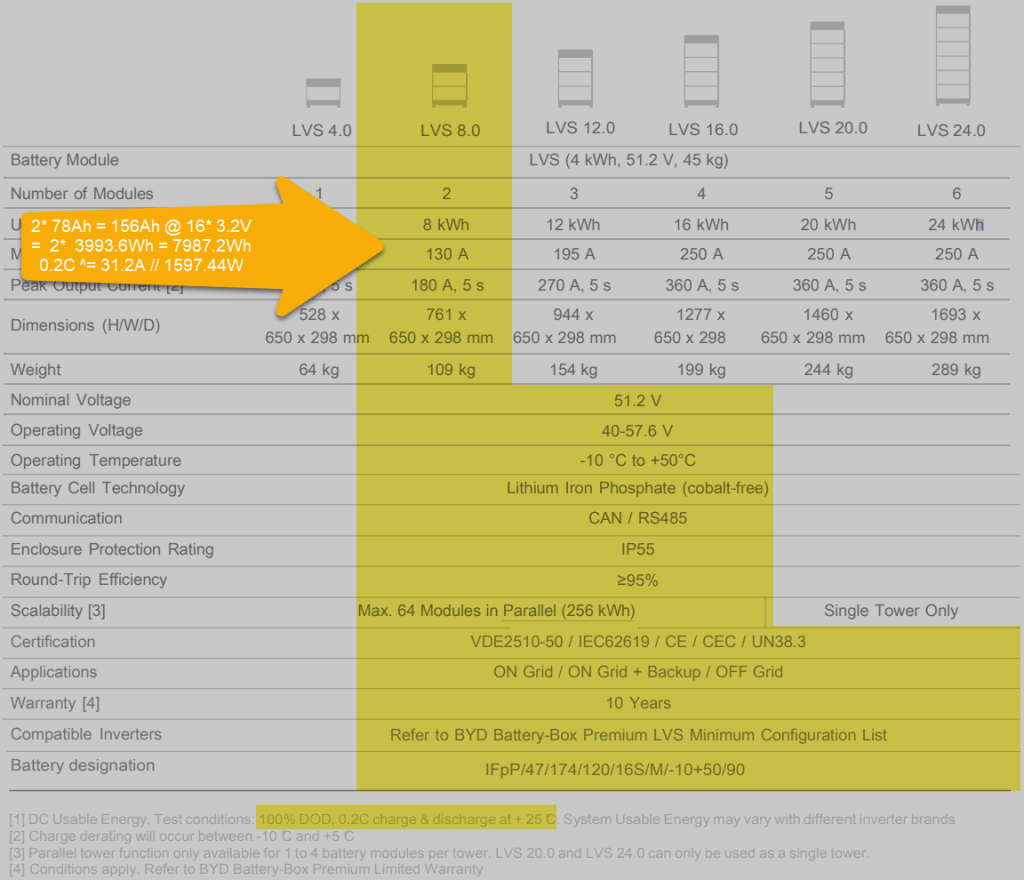
Each LVS 4.0 has a capacity of 78Ah @ 51.2V = 3993.6Wh. The GX shows this information in the “Details” item within the battery. I could not find this information in the manual.
The BYD manuals state, that the lifetime of the battery can only be achieved at 0.2C, which limits a single LVS 4.0 to 798.72W (or 1597.44W for a LVS 8.0) – this is a ridiculous small amount.
Charge current was initially restricted to 38.4A by the battery, only after a day or so, the charge (CCL) and discharge current (DCL) went up to 128A. In my case the inverter only support 35A max, so no issue with that.
Startup sequence Start top-most battery first by pressing the power button for a couple of seconds; then start the BMU if not automatically started; next start the inverter; then start the GX (in my case currently on the AC side).
Shutdown sequence Turn off the inverter; turn off the BMU; turn off the individual batteries (keep buttons pressed for a couple of seconds); GX turns off automatically.
Adding a CAN hat in VeCanSetup needs to be entered literally as a hat.
Though I set the AC charge current to 20A the inverter only drew 16A at most.
The WiFi of the BMU cannot be changed, nor the password.
BYD RS485 CAN pin layout, taken from the BYD BMU maualBYD to Victron CAN pin layout, taken from the BYD BMU manualBYD Battery-Box voltage and charge limitsSpecification of BYD LVS 8.0, taken from the BYD manuals
Future improvements
I want to connect the Raspberry to the DC side with a 48V/12V step-down converter and a 12V to USB-C adapter. Inbetween I want to add a power bank, so the GX can be configured even if all power sources are down.
Replace the CAN hat with a USB CAN adapter
Strengthen the connection of the CAN wire to the CAN adapter
All in all, the installation was straightforward. A couple of uncertainties are probably normal when doing this the first time. I would have expected more documentation (articles, videos) for this to be around. But I could not find anything for a BYD, Victron, VenusOS via Raspberry setup. Maybe others are only using a Cerbo GX?
The batteries are well built (all IP55) but extremely bulky and pricey. With around 400 CHF per KW this is more than 300% of regular LiFePO4 cells. But nevermind, lead and delivery times are in the magnitude of months.
I would have liked the BMU to be integratable into one of the PDU boxes. Now it is just hanging around separately.
Would I buy another Battery-Box? Probably not – too pricey. But good for starters. Plug and play when used with Victron and a Cerbo GX.
I am not the first and probably not the last, either. With leisure batteries becoming larger and larger, fuel becoming more and more expensive and the EV charging network better and better, I thought it was time to rethink charging leisure batteries in campervans, mobile homes and the like.
As I restrict the charging of my EVE 280Ah cells to 125A, the maximum power to charge with is either 8* 3.2V * 125A = 3200W for a 8s 24V battery or 16* 3.2V * 125A = 6400W for a 16s 48V battery. But as of now, I only plan for 24V batteries in our vehicles. This means, that even with the lowest single phase Type 2 charger in a EV charging station we get more power (16A * 230V = 3680W) than the battery can be charged with.
and a single phase Type 2 socket to a Swiss T23 socket, which they call a “bike adapter” – this comes in handy at charging stations with a 3-phase Type 2 cable.
As a 24/3000 MultiPlus-II (or EasySolar-II) does only support charging of up to 70A (resulting in a nominal charging power of 24V * 70A = 1680W), we would still be 55A “short” of the desired maximum charge current of 125A. With the EasySolar-II GX or the MultiPlus-II GX there is no 24/5000 version and the MultiPlus-II 24/5000 uses considerably more power (18W vs 13W) and is way heavier (30kg vs 26kg [including MPPT charger] vs 20kg). In addition the inverter would be massively oversized as the maximum expected inverter power would be limited to 8* 3.65V * 125A = 3200W (^=4000VA), anyway.
So, I came to the conclusion the least expensive and space/cost-efficient solution would come in the form of a Victron Skylla-TG 24/50A Charger:
So, with the combined power of the EasySolar-II and the Skylla-TG (70A + 50A = 120A), I can now theoretically charge at 8 * 3.2V * 120A = 3072W – near the maximum supported power. As the charge current will probably reduce at around 80% SOC, my 24V battery can be charged from 40% to 80% within one hour – at a price of less than 30p per Kilowatt (or 90p the hour)!
Here a comparison with some smaller generators:
a Honda EU10i will deliver 900W with 0.538l (around 1671W/l or 0.598l per 1000W)
a Honda EU22i will deliver 1800W with 1.075l (around 1675W/l or 0.597l per 1000W)
a Honda EU32i will deliver 2600W with 1.394l (around 1865W/l or 0.536l per 1000W)
If one liter of E7 costs roughly 1.50 GBP, the price per 1000W is between 0.80 GBP and 0.90 GBP.
Comparison of different charging options
And with a standard vehicle alternator of 100A the maximum charge current for a battery would not exceed 60A. So, a realistic amount of power to charge the battery with a running engine is around 12V * 60A = 720W. If we expect the vehicle to use 2l per hour running idle, the price for 1000W would sum up to over 4.17 GBP – not cheap.
Only the Honda EU32i comes near to the maximum charging power of 3200W/h. But the initial cost for the inverter and the price per 1000W is far beyond the cost of an additional AC charger, a Type 2 adapter and the energy cost at the EV charging station. And ideally, the energy from the EV charging station is “greener” than the energy from the vehicle or stand-alone generator.
Note: I did not write about solar panels at all. The reason for this is our special “use case” where we are mainly in northern europe where during autumn and winter there are very little hours of sunlight – at a time when we need energy the most. Plus, only two of our vehicles have actually space on the roof for solar panels.
This is my current take on charging larger leisure batteries. What is your opinion on this?


















 Our Journey to Scotland