
Today, I tried to run a C# console application on a Venus OS – and it pretty much worked right away. But why would I want to do that?
The answer is simple: a couple of weeks ago I started to add some “drivers” to Venus OS to support additional features like using a MultiPlus-II as a charger for top balancing cells. With Venus OS, most of the examples I found were written in Python (except for some C++ extensions). And it is no secret that I am not too fond of that. So, why not using my favourite programming language on Venus OS as well?
My first thought was, I would have to install the .Net framework on Venus OS. But, with the advent of self-contained (and thus framework-independent) executables this is not needed.
First, I installed .NET on a Raspberry Pi 400 with Raspbian (just for the fun of it). I basically followed Deploy .NET apps on ARM single-board computers:
curl -sSL https://dot.net/v1/dotnet-install.sh | bash /dev/stdin --channel STS

echo 'export DOTNET_ROOT=$HOME/.dotnet' >> ~/.bashrc
echo 'export PATH=$PATH:$HOME/.dotnet' >> ~/.bashrc
source ~/.bashrc

dotnet --version
… and there it is!
And then it was time for another infamous Hello, world!:
dotnet new console -o HelloWorld
cd HelloWorld
And now for the compilation.
dotnet publish --sc -r linux-arm -c Release -p:PublishTrimmed=truelinux-arm was needed, as Venus OS is a 32-bit operating system (regardless of the 64bit architecture of the Pi 400). I chose PublishTrimmed to save some space. And of cource, --sc for self-contained.
I then gzipped the publish folder and copied it to the Venus OS (via WinSCP). After uncompressing the files (with permissions left intact), I ran the program and got this error:
Process terminated. Couldn't find a valid ICU package installed on the system. Please install libicu (or icu-libs) using your package manager and try again. Alternatively you can set the configuration flag System.Globalization.Invariant to true if you want to run with no globalization support. Please see https://aka.ms/dotnet-missing-libicu for more information.
Enabling invariant mode seemed to be the easier choice. After all, my future drivers would hopefully not need globalisation support anyway. So, I recompiled after adjusting the .csproj file:
<PropertyGroup>
    <InvariantGlobalization>true</InvariantGlobalization>
</PropertyGroup>
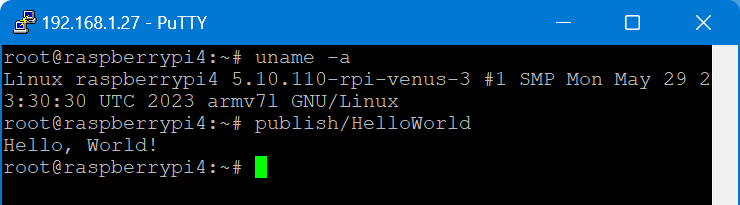
… and it worked:
root@raspberrypi4:~# publish/HelloWorld
Hello, World!
I executed this on a Raspberry Pi 400 running Venus OS v3.00 and .Net 7.
From there, I wanted to connect to D-Bus which proved to be more difficult. Following the Connecting .NET Core to D-Bus I had to find out that Tmds.DBus.Tool was not compatible with .Net 7. I will have to look into that separately.
Note about IL trimming: the size difference is really noticable. In my example the untrimmed compilation was around 65MB and the trimmed version around 13MB. However, it seemed to me that the trimmed version took slightly longer to load and execute. So, I am not sure if I will keep this switch on.
So, what would be the perceived advantages of using .Net on Venus OS for me?
- Known developing environment
- Better type safety
- Reusability of a lot of basic code
- Easier testing and mocking
But this is only my personal opinion and preference. Yours might differ.

 Our Journey to Scotland